Friday, 7 March 2014

The End is Near! Concluding thoughts on ICT


This past week has been met with mixed emotions as we conclude our class time portion of this term, and get ready to start our final student teaching placements. Although I am very excited to be back in the classroom, and to be one step closer to the end goal of being a certified teacher... it is sad to say goodbye to all the friendships made along the way with fellow students and professors. I will miss them all and look back on our time of learning together fondly. 

As I think back to all that I have learned from my professor Mike Nantais in ICT over the past 2 years, it is amazing to reflect on how far I've come in terms of implementing technology into the classroom and in daily life.  Some new digital skills/strategies I have acquired include:
  • Creating videos
  • Creating digital stories
  • Creating websites ( In ICT I was able to make a classroom website and a professional portfolio online)
  • Writing a blog
  • Building a professional learning network on twitter and GooglePlus
  • Using a bunch of great websites, such as: tagxedo, worlde, pixlr, pearltrees, weebly, animoto, photofunia, compfight, iMovie and Movie Maker, Prezi, HaiukDeckm etc.
  • The list continues, these are just to mention a few!
I am so grateful for all that I have learned and will be able to take with me into the classroom. I owe a big thank you to Mike Nantais and my fellow classmates who have all taught me so much in the past 2 years. I wish you all the best of luck in the future!

Stay tuned for posts on my experiences in my final student teaching placement! ~ Miss A

Tuesday, 25 February 2014

Reflections from Westcast 2014

Last week, I had the pleasure of attending the Westcast 2014 Conference in Winnipeg, MB. Westcast provides pre-service teachers like me with a great sharing and learning opportunity. It gives us the experience of presenting and attending other students' sessions, and allows us to make connections and share ideas with future teachers from Universities all over western Canada. 

A session that really excited me was, "Inquiry-Based Learning Through Genius Hour," presented by Sean Giesbrecht and Clara Haimes-Kusumoto. Genius Hour, is basically an hour a week or day (whatever works best in your classroom), where students are given the opportunity to research and learn about something that is of interest to them. They may cover numerous topics throughout the school year of which they become a "Genius" at, and they share their findings with their class (in whatever way they choose) at the end of each topic.

Genius Hour follows the principles of Daniel Pinks book on Motivation, "Drive." That is, it gives students opportunities for:
  1. Purpose: Students may work to solve a problem, reach a goal or uncover interests
  2. Autonomy: Students are given choice and power over their learning
  3. Mastery: Students are given the time, resources, and skills to become a "Genius" of their chosen topic
Here's How it Works:

When introducing Genius Hour into your classroom, you might have your students brainstorm the meaning of the words, "Genius," and "Hour." For example, in this session we thought of  innovative master, knowledgeable, abstract and creative for Genius, and a block of time or 60 minutes for hour. You may also introduce Genius Hour with a Kid President video.


The format of Genius Hour is simple. The teacher is setting up a block of time for students to follow these 3 steps:
  1. Research
  2. Prepare
  3. Present
Included in these 3 steps, are: 

1. Think Time:
  • Differentiate between thin vs. thick questions
  • Talk about how to create essential questions
  • Teach inquiry skills 
2. Work Time and Research:
  • Teach research skills
  • Provide lab time
  • Show students how to get involved in the community to find answers to their questions and encourage them to do so.
3. Assessment:
  • Formative (Conferencing) and Summative (Check-list of criteria agreed upon in class) Assessment
  • Peer/Self Assessment
  • Exit Slips
4. Celebration:
  • Gallery Walk
  • Question and Answer Period, Star and a Wish
  • PowerPoint, Prezi, Student Choice
  • Full Participation
 I love the idea of implementing Genius Hour into the classroom. I think it would be super engaging for all students and would help create a great classroom learning community. If you are interested in starting Genius Hour in your classroom, here are some websites the presenters left us with:
www.artjunktion.com


~Miss A

Monday, 24 February 2014

Pay it Forward... A Great Project for Teachers and Students!

http://m.youtube.com/watch?feature=youtu.be&v=fhHmX4V27Ms

When you give students the freedom to be creative and take ownership of their learning.... they just might do something amazing! The professor of my ICT class found this out, after giving us the assignment of creating a video with the topic of our choice, which resulted in him being given a coffee and a cookie. Amazing, right?! ;) 

Some of you may have noticed that there is a new fad of "NEKnominations" that have gone viral all over the world. The jist of this nomination: It involves the person who is nominated downing a drink, within 24 hours of their nomination and then passing on the torch to someone else. Somehow this has really caught on and lately my facebook wall is full of video's of people participating in this. I couldn't help but think how pointless this all seemed and wondered if a positive nomination of people doing good for others would catch on like NEK nominations have. So, when brainstorming video ideas with my group members, we came up with the idea of PIF nominations, which stands for Pay It Forward nominations. We then set to work, thinking of simple, small ways that we could brighten the lives of those around us, and we created the above video.

We have decided to share our video online and are challenging everyone to participate in paying it forward. PIF nominations would be a great project for building community within a classroom. Students could complete a PIF nomination individually or as a class, brainstorm some good deeds that they can do for others and have the experience of creating and sharing a video. They would also share the sense of accomplishment and the warm and fuzzy feeling of helping others. I plan to do a PIF nomination in my upcoming final student teaching placement. I hope you will join me and my group members in spreading this nomination. Good luck everyone! ~Miss A

Monday, 17 February 2014

Video Production, Digital Stories, Website Building, and Photo Editing... We've been busy!

These last few weeks our ICT class has been very busy learning how to create videos and digital stories, build websites, and edit photos. These are very useful tools/skills to have experienced firsthand.  I am excited to share these ideas with students, and have included a bunch of links to online resources in this blog post. Check them out. :)  

Video Production & Digital Stories

Video production and digital stories are a fun and creative way to have students present and share their knowledge and ideas with the class.  I really enjoyed using animoto to create a personal digital story: Our summer Trip- Las Vegas 2013 I think that there are many educational ways that students could use animoto. 

Other sites that can be used to create digital stories:
stupeflix
flipsnack
storybird
prezi

Last week, our class began the process of creating a video. To create our video we have decided to use iMovie,  a great resources, however it is only available on apple products. We are still in the process of editing our video, so stay tuned for the final product! Another great resource for creating videos is Windows Movie Maker.

Classroom Website Creation

Creating a website is another great way for students to share information, and is a great skill to have. I created my own classroom website in preparation for my teaching career, using weebly. Weebly has been very user friendly and it creates attractive and easy to navigate sites. 

Other sites that can be used to create your own website:
Simple Site
Yola

Photo Editing

One way of finding great photo's is searching compfight photos, and selecting "creative commons," to find photos that are free to use ( so long as you give credit to the photographer). Once you've selected your photo, you can edit it using pixlr. This is my favorite way to find and edit photos because it is so simple. Here is an example of a photo I found on compfight and edited with pixlr: 

Other sites that can be used for photo editing:

I hope you are able to try out some of these awesome resources with your students. 

Until my next post,
~ Miss A

Tuesday, 11 February 2014

Stephen Tonti Ted Talk: ADHD as a difference in cognition, not a disorder.


ADD and ADHD diagnosis' are becoming more and more common and medication is often the answer to "fix" students with these "disorders." Stephen Tonti is a young man who was diagnosed with ADHD in the second grade. In the above video, he provides his audience with a glimpse and a better understanding of what it is like to have ADHD. This understanding is very beneficial for teachers who are likely to come across students like Stephen and will need to know how best to teach them. 

Stephen discusses how it is hard for him to focus on the "mundane" things in life, however when his curiosity is peaked, he is able to hyperfocus. What does this tell us as teachers? We need to know our ADHD students well and provide learning opportunities that will peak their interest... this is something we should strive to do for all of our students. 

Stephen says, "We are attention different, not attention deficit." He urges his audience that society needs to have a healthier attitude towards ADHD and not view it as a negative or something that needs fixing. He says, "ADHD can't be fixed, it can only be sedated," and describes the effects of medication as an added weight or pressure. He provides an example of this, quoting a report a teacher had made of his friend Adam, who also has ADHD:  "Adam is less motivated, less animated and less involved in class activities. But at least he is quiet now." It is so disheartening that this teacher would rather have a "quiet" student, as opposed to a motivated, involved and animated student. This brings me to Stephen's next quote: "Learning differently requires teaching differently." Rather than changing our students through medication to make them "quiet" for class, maybe it is the teachers who need to change. Perhaps moving from the traditional teacher-led classroom to a student-led, democratic classroom would have been a great fit for Adam, and very beneficial for his classmates as well.

 I will conclude this post with a final quote from Stephen: "Our society has to embrace cognitive diversity." I hope that watching this video has given you a new perspective on how you will accommodate students with ADD or ADHD in your classroom. I know it has certainly given me a  lot to think about. Ultimately, the decision to medicate a child with these cognitive differences is up to the parents. However, as a caring teacher, I will be sure to let parents know that I am willing to create a learning environment that is able to meet their child's needs without the use of medication and with the parents support. I think that is the best that we can do. What do you think?

Until my next post, 
~Miss A

Saturday, 1 February 2014

Literacy with ICT Across the Curriculum - Notes from John Finch

Yesterday, our ICT class was privileged to have John Finch visit and talk to us about, "Literacy with ICT Across the Curriculum." This document can be found on this Manitoba Education Government Website. The website provides us with a great definition of Literacy with ICT:

"Literacy with Information and Communication Technology (LwICT)
means thinking critically and creatively, about information and about communication, as citizens of the global community, 
using ICT responsibly and ethically."

John Finch expanded upon the ideas presented in the above definition to give our class a better understanding. He talked about the Inquiry process, and how well it works with LwICT.  The first part of the LwICT continuum is called, "Plan and Question." John talked about the importance of helping students develop thin questions into thick questions through the inquiry process. The second part of the LwICT continuum is called, "Gather and Make Sense." John told us that when gathering and making sense, kids often suffer from information overload. He told us that kids need to think about the information they find through 3 different lenses:

                1. Validity- Who wrote this? Why did they write it?
                2. Reliability- Is this a consensus? Who agrees?
                3. Currency- How recent is the information?

To develop critical thinkers, kids must actively consider those 3 lenses and think critically about everything they read and see. Not only is it important for students to think critically, but it is also important for students to think creatively. The ability for students to create and publish is contained in the devices that nearly every student holds in their hands, providing plenty of opportunity for them to use their imaginations. So why not let them? Often teachers worry that students will become off task when using their devices. However, if students are fully engaged in the inquiry process, we need not worry. 

It is important for teachers to allow their students to communicate and share beyond the four walls of the classroom. Allowing and providing students with a platform to do this greatly affects student motivation and the quality of their work. When kids are writing for an audience, they feed off of feedback. John likened this to Facebook, saying that no one would post anything on Facebook if it weren't for the feedback that they received. People are motivated to share when there is an audience. By allowing students to share their work online, teachers are providing their students with greater opportunities to receive descriptive feedback from multiple people. This will help to inform students of what they do well and what they can  improve upon. The final stages of LwICT are: Produce to show understanding, communicate and reflect. Like the inquiry process,the LwICT Continuum is cyclical. It continues and is not always in the right order. Students may jump back and forth between different stages. To quote John, "We want students to ask better and deeper questions. We want to move kids through the continuum so we can assess what stage of the inquiry process kids are at."

I am excited to have learned more about LwICT. It provides a great framework for teaching instruction and assessment. I look forward to referring to this document throughout my teaching career. Thanks John! ~T


Tuesday, 28 January 2014

George Couros' 5 great reasons to create an online portfolio... just in the nick of time!

Why create an online portfolio? Who better to take notes from than Mr. George Couros?!  Just as I was contemplating why I should spend countless hours creating a professional online portfolio, I came across this blog from George: 5 Reasons Your Portfolio should be online. Talk about perfect timing!! For those of my classmates who are short on time and contemplating creating their own online portfolios, here's what George has to say in a nutshell!

  1. The Google Factor: A digital portfolio means a digital footprint! As future educators it is important that we have a positive online presence and teach our students to create the same!
  2. Searching and Organization: Rather then flipping through a large paper binder, fellow teachers and employers can easily navigate though your online portfolio and quickly find what they are looking for.
  3. Anywhere, any place and any time access: This point is all about convenience. Don't have that portfolio binder on hand? No problem, here's the link!
  4. Creating Opportunities instead of looking for them:  It's important to remember that the thoughts and ideas you have are unique and may be very useful to others. When you publish your work online, anyone can view it, connect with you, and as a result, opportunities may come knocking. Aren't you glad you clicked, "Share?!" :)
  5. Continuous Learning: George encourages us to, "look at online portfolios as both a way to "showcase" and "learn."" The process of creating a portfolio is a great way to solidify ones ideas, beliefs and philosophy surrounding education. As future teachers this is a very important process for us to go through. 
For the full version of George's 5 reasons to create an online portfolio, check out the link posted above. Good luck everyone and stay tuned for the publishing of my online portfolio... this slight perfectionist better get to work! ~T

Monday, 20 January 2014

Shelley Wright: An inspirational Inquiry-Based Teacher


I have just realized  a new reason to love blogging! In my previous post, I shared some thoughts I had on inquiry-based learning and expressed my interest in continuing to learn about this teaching style. One of my professors, Mike Nantais read my post and suggested that I follow Shelley Wright's blog, a high-school teacher from Moose Jaw, SK. So I've read through some of her blogs and watched the above video, and as a result I have been left feeling so inspired! Not only am I inspired by Shelley and her students, but I'm also inspired by blogging. If it hadn't been for my previous post, I may have never been able to learn from Shelley, and hopefully connect with her in the future.

"Our students will exceed our expectations of them, if we only give them the opportunity." I love this quote from Shelley in the above video. As adults, I think many of us are guilty of limiting young people with our expectations. We tend to be more rational, logical and realistic. However, kids aren't like that, and when given the opportunity, they can do amazing things. Shelley's video is a great example of that. If you are also interested in inquiry-based learning, I recommend following Shelley Wright's blog.

Have a great day! ~ T

Wednesday, 15 January 2014

A Return to Blogging and my thoughts on Inquiry

Well, the last time I blogged was at the end of the "Internet for Educators," course last year. While I enjoyed organizing my thoughts through the process of blogging, and had good intentions to continue throughout other classes and student teaching placements, my blog seemed to fall lower and lower on my list of priorities, and was eventually forgotten. That was until the course, "Using ICT in Education," started again this January. My classmates and I were given the option to blog once a week, or come up with a summative assignment capturing the learning that took place throughout the course at the end of the term. Choosing to blog was an easy choice for me, as I find it helps me through the learning process. I hope that this time I will be able to stick with it and blog throughout my final student teaching placement and into my teaching career. I think blogging is a beneficial practice for all teachers.

The illustration I created above, using "tagxedo.com," is a reflection of my brainstorming that took place when thinking about technology and its many uses. There is one word that I find especially meaningful. This word is, "Inquiry." Lately I have been learning about inquiry circles, and  the inquiry process through the science curriculum. The idea of having an inquiry based classroom has totally shifted the way I feel about teaching. We have talked a lot about how we were taught in the past. The classroom was teacher-led and the teacher gave you all the information for each subject. Students crammed for tests to regurgitate this information. No wonder school sometimes felt like a drag, instead of an exciting place of learning. As future teachers, we are now being taught to teach through inquiry, and allow our classrooms to be more student-led. Instead of "teaching" and providing students with material, we are instead facilitators of learning, as well as co-learners with our students. We provide our students with ways to find the answers to their questions. I feel that researching through various forms of information to find answers is such a useful skill for students to have in this modern day society where information is held at everyone's fingertips. I also think it's important for students to be taught how to properly research on-line. An inquiry-based classroom is an engaging one, where meaningful learning takes place. I look forward to furthering my knowledge in this area, and teaching more through inquiry in my final student teaching placement. A great resource from which I've been learning about Inquiry Circles, is the book: "Comprehension and Collaboration: Inquiry Circles in Action," written by Stephanie Harvey and Harvey Daniels. This book is very helpful in learning how to implement Inquiry Circles into your classroom and I highly recommend it. Until my next blog.... ~T

Saturday, 9 March 2013

The end of another term, and a final "I4Ed" post

The end of another term is upon us, and that means the end of "Internet for Educators," blog posts. But I plan to continue blogging as I have found that I really enjoy it. It's a great way to track my learning and share it with others. So as I am inspired with new knowledge, I plan to keep up with this blog in the future. :) I have really enjoyed the I4Ed course and am thankful for all the connections I have made. It felt great to be pushed out of my comfort zone in the world of technology. Although it was difficult figuring out some things in the beginning, I now see the benefits of all that was accomplished in this course.

Thank you Mike Nantais, guest speakers, and fellow classmates for a being a part of this great learning experience. I have attached my final project for the term in the link below. It is a review of some of the many things I have learned in this course. ~T

Summative Project

Thursday, 7 March 2013

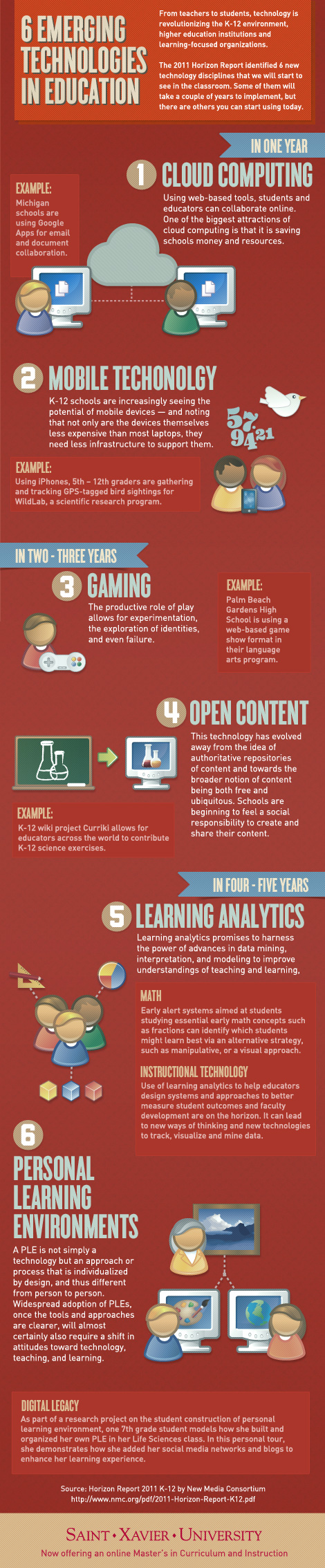
Infographics....Information visually displayed using graphics?

6 Emerging Technologies in Education Infographic

After researching and looking at infographics, I found this one on the 6 Emerging Technologies in Education. <--- My last post happened to be on this topic and I must say that the same information presented in this way is so much more visually appealing than the super long blog I wrote about it. There in-lies the purpose of infographs: To provide a visual representation of information in a quick, clear and visually appealing manner.

Infographics could be very useful in the classroom. When teaching information that may be difficult to understand, infographics provide a visual component to make understanding easier. Although infographics are time consuming to make, once you have made them you have them forever and can share them with others.

The infographic that I made was on "The life of a hashtag." The hashtag I chose to use is the one that we have been using in this course: I4Ed. --->

Conclusion: +Tyler Letkeman wooped us. Thanks for tweeting Tyler! ~T

Sunday, 3 March 2013

What's next? What does the future hold for education?


The field of education is one that is continuously evolving, growing, changing, moving forward etc.,... Bottom line: It is very dynamic! When looking ahead to the future of education, we should continue to expect change. This is one of the things I love about my future career! I love learning new things and know that I will always be challenged to learn and grow as an educator in this field. I could not be more excited about the knowledge I will obtain in my teaching years and pass on to my students.

Education has been a dynamic field before the introduction of technology in the classroom. However, technology has expanded education and created a great deal of change in the classroom in a short period of time.  Allow me to use my K-12 education as an example. When I first started school, teachers used blackboards, then upgraded to white boards, and now it is rare to find a classroom that does not have an interactive Smart Board.  I should also mention that there was no access to computers in my early years classroom, which then gave way to having a few of the huge dinosaur (and very slow) computers in my middle years classroom (which we used for the sole purpose of improving our typing skills). Flash forward to classrooms today and you will find IPads, IPhones, IPods, netbooks and laptops available for students use. Does anyone else remember those awful overhead projection machines that were impossible to see around, or the sound of the TV stand wheels coming down the hallway to enter your class so you could watch a video? I’m not sad at all that those days are gone. 

It is clear that with technology education has already come very far. But what is next? What does the future hold for education? After reading the K-12 Horizon Report, I think it is safe to say that emerging technologies will continue to have a great impact on the education field. So what can we expect for the future? The K-12 Horizon Report names 6 technologies to watch for.

The first is Cloud Computing: “The emergence of very large “data farms” — specialized data centers that host thousands of servers — has created a surplus of computing resources that has come to be called the cloud. Growing out of research in grid computing, cloud computing transforms once-expensive resources like disk storage and processing cycles into a readily available, cheap commodity. Development platforms layered onto the cloud infrastructure enable thin client, web-based applications for image editing, word processing, social networking, and media creation” (Johnson, L.,Adams,S.,and Haywood,K., p.10).

The second is Mobiles. “It is no arbitrary decision that the statistical point of comparison is between new lives and mobiles; the next generation of students will inevitably be armed with smarter mobiles at younger ages. Perhaps even more important for education is that Gartner Research projects Internet-capable mobile devices will outnumber PCs by 2013. In Japan, over 75% of Internet users already use a mobile as their first choice for access. This shift in the means of connecting to the Internet is being enabled by the convergence of three trends: the growing number of Internet-capable mobile devices, increasingly flexible web content, and continued development of the networks that support connectivity” (Johnson, L., Adams, S., and Haywood, K., p. 14).

The third is Game-Based Learning. “Developers and researchers are working in every area of game-based learning, including games that are goal-oriented; social game environments; non-digital games that are easy to construct and play; games developed expressly for education; and commercial games that lend themselves to refining team and group skills. Role-playing, collaborative problem solving, and other forms of simulated experiences are recognized for having broad applicability across a wide range of disciplines” (Johnson, L., Adams, S., and Haywood, K., p. 18).

The fourth is Open Content. “The movement toward open content reflects a growing shift in the way academics in many parts of the world are conceptualizing education to a view that is more about the process of learning than the information conveyed in their courses. Information is everywhere; the challenge is to make effective use of it. Open content embraces not only the sharing of information, but the sharing of instructional practice and experiences as well. Part of the appeal of open content is that it is also a response to both the rising costs of traditionally published resources and the lack of educational resources in some regions. It presents a cost-effective alternative to textbooks and other materials” (Johnson, L., Adams, S., and Haywood, K., p.22).

The fifth is Learning Analytics.Learning analytics refers to the interpretation of a wide range of data produced by and gathered on behalf of students in order to assess academic progress, predict future performance, and spot potential issues. Data are collected from explicit student actions, such as completing assignments and taking exams, and from tacit actions, including online social interactions, extracurricular activities, posts on discussion forums, and other activities that are not directly assessed as part of the student’s educational progress. The goal of learning analytics is to enable teachers and schools to tailor educational opportunities to each student’s level of need and ability. Learning analytics promises to harness the power of advances in data mining, interpretation, and modeling to improve understandings of teaching and learning, and to tailor education to individual students more effectively” (Johnson, L., Adams, S., and Haywood, K., p. 26).

The sixth is Personal Learning Environments. “Personal learning environments (PLEs) are often described as systems for enabling self-directed and group-based learning, designed around each user’s goals, with great capacity for flexibility and customization. PLEs are conceived as drawing on a variety of discrete tools, chosen by the learner, which can be connected or used in concert in a transparent way. While the concept of PLEs is still quite fluid, it does seem to be clear that a PLE is not simply a technology but an approach or process that is individualized by design, and thus different from person to person”(Johnson, L., Adams, S., and Haywood, K., p. 30).

These six technologies to watch for are listed in order of expected chronological emergence. Some schools are already embracing cloud computing and mobiles. Schools are moving in the direction of having a “Bring your own device,” policy for their classrooms. I found reading the K-12 Horizon Report to be very beneficial. The more knowledge you have about upcoming changes, the more you can prepare yourself to be ready for them. If you are interested in reading this report and learning more about these six emerging technologies and the future of education, you can find it here: K-12 Horizon Report. Happy Reading! ~T

Johnson, L.,Adams,S.,andHaywood,K.,(2011).TheNMC Horizon Report: 2011 K-12 Edition.Austin,Texas:TheNew MediaConsortium.

Our turn to speak: Group Presentation Week!


This past week in I4Ed we did not have a speaker. Instead, we were given the opportunity to work in groups and research a current internet topic in education, and present our findings to the class. First, I must say that I really enjoyed each of the presentations. They were all informative and everyone did a great job!

My group was the first to present. Our topic was on “Bring Your Own Device” (BYOD). Schools are starting to movie in this direction and we were interested in learning more about it. We researched the different devices available for student use (there are many), the statistics around BYOD, the variety of available apps that could be used in a BYOD classroom (again...there are many), the policies for BYOD and the benefits and risks of BYOD. To view all of the information we found, please see our presentation!

The second group to present talked about, "The Good, the Bad, and the Ugly of the internet." The Good: The internet provides students and teachers with quick access to information, and the ability to contact and network with people all over the world. The internet allows teachers to bring the world into their classrooms, and not to mention the millions of resources available to teachers and students online. The Bad: The internet is a great tool... unless it used inappropriately. It is much easier for students to plagiarize today with a simple “copy and paste,” off the internet. Teachers need to be extra cautious of this. The internet also provides students with the opportunity to post any words or pictures online. Young people do not always use their discretion when posting and do not realize the consequences of their online actions. This can get them into trouble. The internet has also formed a new and easy way for bullying to take place. Cyber bullying is another issue  teachers should be aware of and on the lookout for. Lastly, there is credible and non-credible information available on the internet. Teachers need to warn students about non-credible information and teach them how to distinguish it from credible information. The Ugly: The ugly side of the internet includes things like cyber harassment/ bullying, black mailers/predators, and job losses due to inappropriate digital footprints. This last point is so important. As educators, we need to inform our students that their online actions can stay with them for life. Future employers are likely to Google candidates to see if they are right for the job. It’s important to think before your post. To see this groups presentation: click here.

The third groups presentation was called, “How not to steal from the internet.” This was a very informative presentation. I realized how I unknowingly have been guilty of stealing from the internet by not attributing a picture that I used to its owner, or the same with videos, etc. Although I have been lucky so far, the consequences for these actions could be great. So as a teacher, we need to warn and educate our students about how not to steal from the internet. One of the best ways to do this is through modelling. Attribute all of your pictures and videos etc., in your presentations to the class, and educate and expect the same from your students.  To see the website that this group made, visit this website.

The fourth group also had an interesting topic on “Internet Filters.” Internet filters serve a great purpose. They prevent inappropriate online behavior, and monitor and protect students from inappropriate content. However, this group brought up the point that sites that can be a great learning resource are unfortunately also blocked to meet these goals. For example, Twitter, YouTube and Pinterest, just to name a few, are often blocked from both student and teachers use. The connections and resources available from these sites are endless and it’s a shame that students and teachers are unable to access them. For more information about internet filters,check out this website.

The last group had a very entertaining and unique presentation on "Cyber Bullying." This group made their own video to portray the way that the media blows up the issue of cyber bullying. Cyber bullying is a serious issue, however research shows that it is the least common form of bullying. So why does it get so much attention? The media! It’s important for educators and everyone to look at the facts. If cyber bullying is the least common form of bullying, let’s find out what the most common form is and focus on that. To check out this video, visit this link.

With one week of class remaining, I have learned so much from our presenters outside of BU, and the presenters’ right inside our classroom. Great job everyone! ~T

Saturday, 23 February 2013

App Show and Tell!

Did you know that there is an App for Edmodo?!!


If you aren't familiar with Edmodo, it is a free website that provides an easy and safe way for teachers to connect with students and students to connect with each other. The layout of the website is very user friendly and resembles the layout of Facebook. Edmodo provides teachers with a way to engage students, connect to resources, measure student progress, and personalize with apps. To learn more about Edmodo or sign-up, click on this link.

Edmodo is a communication tool that I really like and plan to use with students when I have my own class. It is an even more attractive communication tool now that I know that there is an app for it, which makes communicating with students and teachers easier than ever!  Have fun exploring Edmodo! ~T


Friday, 22 February 2013

Online Video in the Classroom!

Watching videos in class has changed drastically over the years. Gone are the days when students anticipated the sound of the squeaky TV stand wheels entering their classroom. Those big, fat, and heavy TV's seem like dinosaurs compared to the new slim and sleek ones that entertain and educate us today. However, students often don't even watch videos on TV's anymore period. Instead, videos are uploaded online for students to watch and are displayed by projectors onto white boards. Projectors and white boards... terms that were never even heard of in the day of the dinosaur TV.

As educators, we are extremely lucky that technology advances have provided us with endless viewing opportunities to supplement our teaching in the classroom. Videos provide a great way to engage students in what they're learning, and help aid visual learners. Before taking the I4Ed course, I assumed the only source of videos for teachers was YouTube, a sight that some schools have banned due to inappropriate use by students, and inappropriate commercials and adds. Luckily, teachers can also access videos through TEDEd,Vimeo, and iTunesU... sites that I just checked out for the first time and am certain to get a lot of  use of in the future.

The first video I found is on Vimeo, and it provides a comical way to introduce "Oxygen," and how this element interacts with other elements. I really enjoyed watching it and have no doubt that students will enjoy it to. This video could be used by educators who teach science or chemistry. Oxygen Video

The second video I found is on TEDEd and is called, "How we see colour." This informational video could be used by educators who teach health, science or biology to help students visually understand how we see colour... something that would be hard to do without a video.


I wish that I had known about these online video resources in my first student teaching placement. However, I look forward to utilizing them in my second placement, coming up soon (March 11th)!  I also think that having student create a video about a topic that they have learned is a great way to bring technology into the classroom. We could then share our video online so that other students could learn from it. As I have said, the possibilities with technology are endless. :)~T

K-12 Greatest Hits... A Great Podcast for educators!

Podcasts Galore!
Wow! I have to say I am shocked at the endless amount of educational podcasts that are available and free for teachers to listen to! I am so excited about discovering this new way to learn and grow as a future educator. I like to read, but as a University student I certainly get my fill of books and articles etc., so listening to educational information and ideas is very refreshing! I love how you can choose topics that interest you and within a span of 5 to 10 minutes you gain a great deal of new knowledge about that topic. Educational podcasts provide a quick and easy way for teachers to stay informed about current issues in their field. I came across the K-12 Greatest hits podcast and listened to the segments, "Is homework dead?" and "Keeping up with the pace of education technology."

Is homework dead?
The first podcast, "Is homework dead," interested me because teachers have ALWAYS handed out homework. That's just the way it has always been, so it interested me that this podcast would address this topic. I was surprised to find out that research and studies have proven that homework does not contribute to student learning. A point that was brought up about math homework comes to mind. Personally, I have found that repetition of questions helped me understand math when I was a student. So, when I was out student teaching for the first time I had a tendency to give my students extra math questions that they could take home to work on after teaching a new lesson. However, the point that was made addressed the issue that when students are at home doing homework they do not always have someone to correct them when they are answering questions incorrectly. Students end up practicing their math problems the wrong way and it can be difficult for teachers to get them back on track. I hadn't thought of it this way before. In the future I will adjust this by still offering students practice sheets, but I will not make them mandatory. Another problem with homework is students copying from one another. When homework is made mandatory this can happen quite often and is very counterproductive. When this is happening what are we ultimately teaching students? As a current student and future teacher I am quite aware of the time constraints on students and so I am conscious about  not giving out a ton of homework. I will continue to be conscious of this and only give it out when it is absolutely necessary and after I have given students time to complete their work in class. By cutting out homework, students will have time at home to learn about things that they are interested in and have some much needed downtime. It is important for schools to talk about their homework policies. Just because teachers have always given homework in the past does not mean that we should continue to do so...especially if research does not support it.

Keeping up with the pace of education technology
The second podcast, "Keeping up with the pace of education technology," was also very informative and related well with our I4Ed class. This podcast started off stating that many teachers feel scared and overwhelmed by the fast pace of technology. I sometimes feel this way and am grateful to be a part of a course (I4Ed) that pushes me to use and explore technology in a variety of ways that I'm not sure I would have otherwise (like using podcasts for example). I realize the importance of staying current with technology as it can provide so many benefits to teaching and learning. This podcast offered some tips for teachers with regards to using technology. The first tip which I really like and agree with is to ask yourself, "Is it necessary to keep up with and use everything?" There are so many options for teachers through social networking, bookmarking, blogs and podcasts to follow, etc. Teachers already have many time constraints so it is important for us to determine what works best for us and our students. We don't have to be a part of EVERY bookmarking and social networking site. Another tip offered  was to find a partner that you can explore technology with and work together. It's important for teachers to support each other to keep up with technology. Other tips included setting up a blog (check), joining twitter and following other educators (check) and utilizing this information packed website: www.edutopia.org.

It is obvious by the length of this post that I have already learned a great deal from listening to only two podcasts. I look forward to continue my learning in this way and encourage you to check out the K-12 Greatest Hits podcast! ~T

Thursday, 21 February 2013

Web-based courses with Donald Girouard and Sophia Palahicky


In class today we were visited by two presenters, Donald Girouard and Sophia Palahicky. Donald and Sophia came to share information with us about Web-based courses offered in the Manitoba educational system. Previous to their presentation, I thought of web-based learning as simply taking an online course. However, Donald and Sophia shared that there are actually 4 ways to use web-based learning, which include: 1) As a teacher resource 2) With a face-to-face class, 3) With actual distance learners, 4) As part of blended learning environments. The last one, a blended learning environment, involves using a variety of instructional approaches, which can include face-to-face teaching, HTV or Web Conferencing, Web-Based course options, teacher mediated options, and independent study options. Donald and Sophia suggest that the best instructional models use blended approaches.

So what are the reasons for taking courses online? One of the biggest reasons we talked about was the limited variety of course option available in rural school divisions. In a small town where only 2 students wish to take Physics, the course is likely to be cut. Web-based courses solve this problem and helps small town’s support their students’ educational goals.  Another reason we discussed which I think would be very beneficial for high school students is Credit Recovery.  Students who fail a course are given the option of credit recovery through web-based courses, whereby the student completes units/topics that they struggled with and does not have to re-do units that they were already successful in. Web-based courses also benefit students by offering them alternative methods of learning and earning credits, resolving timetable issues and preparing students for lifelong learning.

A question/concern that Sophia and Donald have heard from teachers about Manitoba’s web-based courses is that online learning will take away teachers jobs. Sophia and Donald assured us that this will not happen. Manitoba Education developed web-based courses to be mediated by teachers, to support teachers and school, to support learners, to assure congruence with the curriculum, and to model good pedagogy for e-Learning and in assessment strategies. So we future teachers need not worry.  With 46 web-based courses currently available, this is sure to be a great resource for educators and students. To see the list of Web-based courses available, click on this link. A big thank you to Donald and Sophia for visiting our class today. ~T

Digital Footprint...

In social media, a digital footprint is the size of a person's "online presence" measured by the number of individuals with whom they interact. -Definition Link

Before I4Ed, I never really thought too much about my digital footprint. However, I've always been conscious about portraying a positive message/image when posting online. I am a fairly private person and only share things about myself that I think my friends and family would be interested in hearing about.

So, when I Google searched myself to check what my digital footprint says about me, I was not surprised when little came up. If you Google search my name (with Brandon, MB beside it), you will be able to find out that I graduated from Elton Collegiate in 2008, and am a Brandon University student. You will see that I have a Facebook account which you will not be able to access because of my privacy settings. You will also see that I have a personal and professional Twitter account. My personal account followers must be approved, however my professional account is open for anyone to see. Lastly, you will be able to read my limited profile on Google+ and there is an image of me that will take you to this blog if you click on it.

After searching myself I am reminded of George Couros telling our class that employers will be searching us to. Although they will not find any "skeletons in my closet," I would like them to find more of my professional ideas and contributions.  Luckily I still have a year to add to my digital footprint! ~T


Extra thought: The task of exploring digital footprints would also be very beneficial for our students, who often do not realize the lasting impacts of their online actions.

Wednesday, 20 February 2013

The internet provides everyone with a voice

In class yesterday, Mike Nantais asked us to address two questions. The first question he asked was whether we thought that the internet gives everyone a voice or whether it oppresses peoples' voice. The second question he asked was whether or not we would incorporate social media into our classroom.

Although there was some debate among classmates, my answer to the first question is a firm yes! I agree with arguments that there are certain cases when videos or posts or removed from the internet, or people are denied access to the internet. Unfortunately in these cases, voices are definitely oppressed.  However these cases do not compare to the amount of people who are freely able to express themselves online each and every day. Everyone has the opportunity to share with the world. We can use so many avenues to share our voice. We can share photos through Instagram, Pinterest, Flickr,  and Tumblr, we can share videos through YouTube and Vimeo, we can write our thoughts on blogs and personal websites,  and we can connect with others through facebook, twitter, and LinkedIn. These are only a few of the ways that we can express our voices with the world. The internet not only provides people with a voice, but it can provide animals and our environment with a voice to, who otherwise would never be heard.. This video is a great (but also disturbing) example of how we can use the internet to raise awareness about the effects of pollution to both animals and our world:

In response to the second question, yes I would absolutely incorporate social media into my classroom. It's important for teachers to stay current and part of that is accepting that social media is a huge part of our students lives. Teachers have the opportunity to show students how to engage in social media in a safe way. In class it was discussed that many students are not even aware that they can modify their privacy options for their accounts, in order to stay safe online. By incorporating social media into the classroom you can help students to build safe learning networks and make connections outside of their class which will only enhance their education.

I look forward to helping my students discover and share their voice with their classmates and the world when I begin my teaching career.

Saturday, 16 February 2013

"WHY are you using technology in your classroom?" ~ Clarence Fisher


Last week our I4Ed class was able to have a quick Skype visit with Clarence Fisher, a teacher who works in the small northern community of Snow Lake. Clarence posed many great points in a small amount of time, however, what struck me the most was this question: "Why are you using technology in your classroom?"

Clarence told us that it is not enough to simply bring technology into the classroom because it can liven up our lesson plans and make our classes more interesting...although these are still great uses. However, we have once again been hit with the idea that there is so much more that we can do with technology through sharing. Through sharing, Clarence has given his students the opportunity to make global connections and build networks with students all over the world.

"Our job as teachers is to help kids have a network of their own that they work within, whether that’s kids in their classroom, or kids on the other side of the world. The learning that occurs in the classroom is only as strong as the network it learns within." ~ Clarence Fisher

In order for teachers to help their students build connections and networks, teachers must be well connected. Infusing students with global perspectives from classrooms around the world is a much better purpose for technology in the classroom than just "making it interesting." How will you make sure that you are using the internet to its fullest potential in your classroom? ~ T

To learn more from Clarene, follow him on Twitter: @glassbeed